
Project
Method v2
The Block Editor, Supercharged
The WordPress Block Editor, also known as Gutenberg, is a web developer’s dream when it comes to performance and security. Directly integrated into the WordPress platform, it absolutely destroys other page building systems when it comes to overall footprint and scalability. Unfortunately, when it comes to usability, responsive control, and robust layout support, it can leave a bit to be desired.
Those limitations are exactly what I built Method v2 to address, with the project’s overall goal being to leverage the unparalleled performance and scalability of the block editor, while providing the toolsets needed to fill in all the feature gaps. Currently, the theme is in early release and is being deployed to new projects. That includes this site, which the framework powers.
What I Did:
Custom Framework
React Libraries
Method v2
Built to Accelerate Block Theme Development

Powerful Layout BlockS
Method v2 includes several powerful layout blocks built to support as many complex layouts as possible. This includes the ability to build complex Bootstrap grids in-editor. Learn More

Responsive AF
Unlike core blocks, each Method block includes controls to override select block settings for up to three device classes: mobile, tablet, and ultrawide.

Modular React COmponents
Devs can easily integrate Method custom controls and features, including responsive controls and CSS generation, into their own blocks by importing Method’s React components.

Layered Background controls
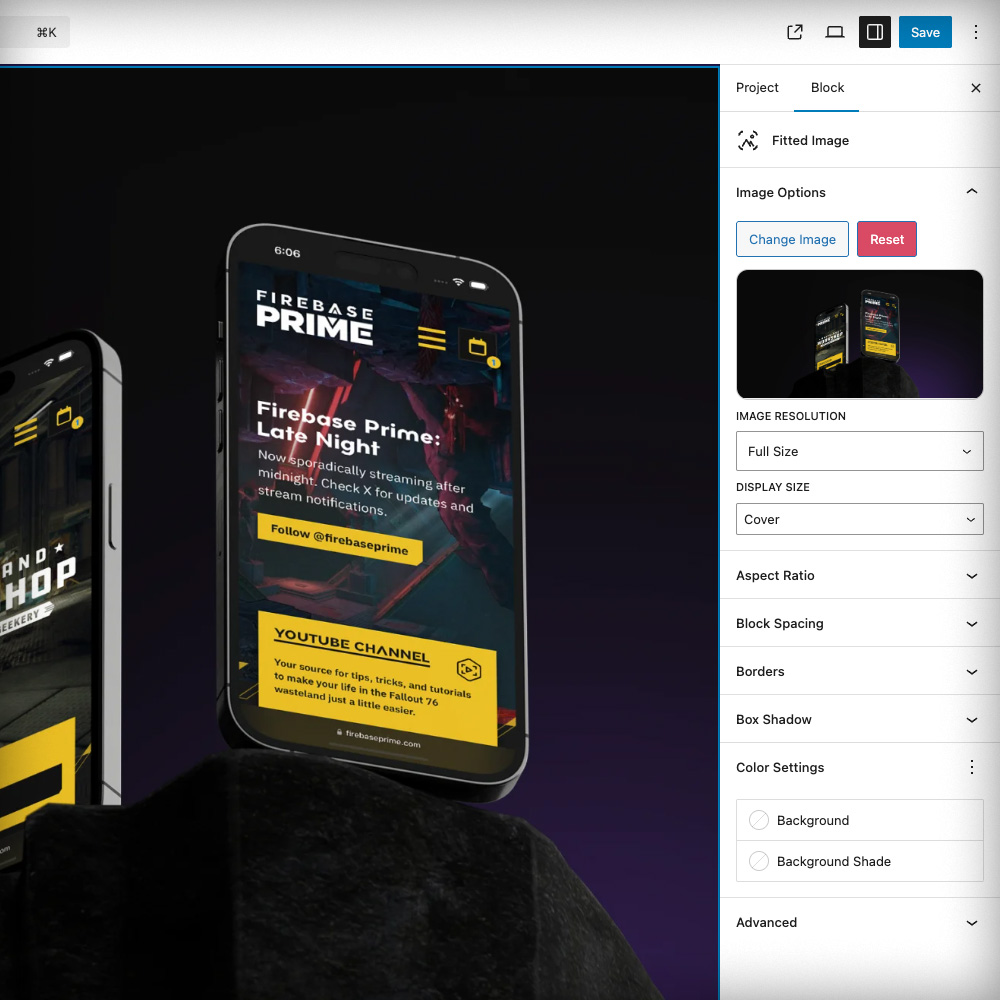
Section, Container, and Fitted Image blocks provide multi-layer background controls, allowing for complex layering of imagery, solid colors, and css-generated gradients.

Dynamic Blocks
All Method v2 blocks are dynamic blocks, using React to render the backend, and php to render the frontend. This means that blocks update when they’re supposed to, no saves required.

Parent Theme Efficiency
Unlike Method 1x, version 2 is intended to be used as a parent theme, making it substantially easier to keep Method’s core codebase up-to-date over the lifespan of a website.
Powerful Layout Blocks
Method v2 was built to address the layout challenges that I face daily when developing non-block themes, with the end goal to make it possible to replicate that work 1:1 from within the block editor via a set of intuitive and powerful custom blocks. To accomplish this, Method includes the following layout blocks:
1
2
3
4
Advanced Grid Blocks
The Advanced Grid block and its child row and column blocks make it possible to quickly build complex 24-column Bootstrap-based grids from within the block editor, complete with all the alignment options and class-based breakpoint overrides that make Bootstrap’s grid system awesome to work with, all configured via custom, optimized controls.
1
2
3
4
5
6
7
8
Basic Grid Blocks
The Basic Grid block and its child grid item block are designed to provide a responsive, more robust replacement for WordPress’ built-in grid block. Items-per-row and several other options can be customized for different breakpoints via the block’s Responsive Behavior options and up to 6 items can be displayed per row, making it ideal for displaying logos, directories, and many other types of content.

Page Headline
The Section Block
The Section block is primarily used to create page headers and wrap large sections of content, featuring vertical alignment controls and layered background controls with support for parallax effects and looping background videos.
The Container Block
Lorem Ipsum Spares No Man
Cubilia parturient vel netus elit fringilla. Bibendum habitasse molestie sagittis volutpat leo adipiscing iaculis. Accumsan natoque lacus in penatibus aliquam habitasse ridiculus dolor justo.
The Container Block
The Container block shares several similarities with the Section block, but is intended for more in-content usage. Within each instance, more containers, grids, and any other block type can be placed. As with the Fitted Image block, each instance of the Container block can be linked to other content, making it ideal for robust callouts, etc.